Inputs to ChartJs
The ChartJs widget in ensemble may sometime not accept variables in plain ChartJS widget so a better way to go about this is to use Code section in ensemble to define configuration for the ChartJs and there we can easily use the variables ( inputs ). In our example we will look how we use labels passed as inputs to the ChartJs custom widget and use them according to our need.
Custom Widget
Widget:
  inputs:
    - spending
    - categories

  onLoad: |

    //@code
    chart.config = {
      type: 'doughnut',
      data: {
        labels: categories,
        datasets: [{
          data: [608, 590, 200, 79, 163,231,637,63],
          backgroundColor: ['#FCA06B','#C66CFC','#8145FF', '#29CB90', '#4DA9CC','#FCA034',"#8145FA","#814500"],
          hoverOffset: 2,
          borderWidth: 0
        }]
      },
      options: {
        aspectRatio: 1,
        cutout: 80 ,
        plugins: {
          legend: {
            display: false
          },
          tooltip: {
            enabled: true,
            position: "nearest"
          }
        },
        layout: {
          padding: 0
        }
      }
    };

  body:
    Column:
      styles:
        gap: 12
      children:
        - Row:
            styles: { crossAxis: center, mainAxis: center, padding: 20 0 }
            children:
              - Stack:
                  styles: { alignChildren: center }
                  children:
                    - ChartJs:
                        id: chart
                        styles: { width: 200, height: 200 }

                    - Column:
                        styles: { crossAxis: center, gap: 0, mainAxis: center }
                        children:
                          - Text:
                              text: Last 30 days
                              styles:
                                textStyle:
                                  color: 0xFF667483
                                  fontSize: 10
                          - Text:
                              text: "$${spending}"
                              styles:
                                textStyle:
                                  color: 0xFF063940
                                  fontSize: 28
                                textAlign: end
Screen Code
Spendings:
  inputs:
  spending: ${ensemble.storage.spendingLastDays.toFixed(2)}
  categories: ${ensemble.storage.categories}
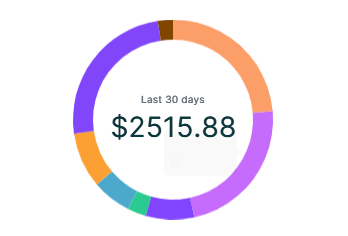
Output
Explanation
The categories and spending are our inputs passed to this Custom Widget from one of our screens. Categories is an array consisting of string values. This input array is used as a value for labels property in the CharJs configuration if you paid close attention to the code for Custom Widget. This is how we can pass inputs to ChartJs and make it dynamic.
Last updated on